Zapier-AI Processing of JIRA Tickets Part 1
Here is an initial try at getting JIRA to categorize and route JRIA tickets based on scrum team membership with AI and Zapier. Most of this is about AI data prep.
It’s just a test, as I hadn’t gotten security clearance for the data from the company yet so I had to be careful:
- Didn’t want to expose anything (in case someone added passwords or something private).
- Don’t want any companies training their AI on our data — the guardrails aren’t fully understood by me nor set up.
Zapier is kind of an automation/connector application and is generous with it’s free accounts. The basic outline of how I am going to accomplish this categorization/routing is in the diagram below.
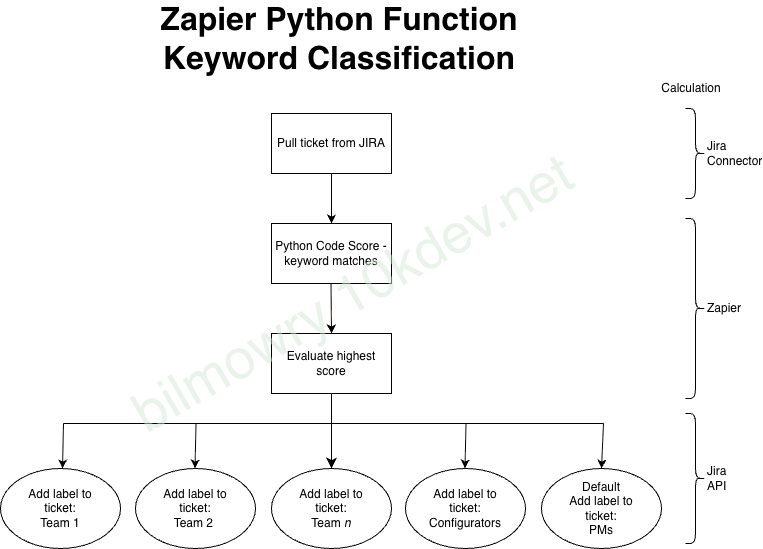
The ticket pull is done via Zapier Jira connection mechanism, which polls the data for changes. The poll right not is the adding of a new commetn on a ticket.
Once a ticket is found its data is retrieved — the scrum team name, description, summary (title) etc. From here the data is evaluated based on (highly de-identified) set of data that was trained in a model with OpenAI.
An evaluation score is sent back — based on the categorization probablity (scrum team name) and the answer is posted back to Jira as a label for assignment.
From here on out, a sprint assignment could be automated, or, a PM could review. Jira has a lot of automation capability with labels and data.
But the point is the Zapier flow is doing the categorization.
Getting JIRA Data
To get some data out of JIRA, I just used the Jira Cloud for Sheets data connector. First, you can write some kind of filter query in jira an save it. (Also, you can use the jql it’sef, but I prefere to test it using Jira). Then in Google Sheets you can set “=JIRA(“filter=<your id>,”issueType,key,summary,priority,status,assignee,reporter, ….,5000). The 5000 being the number of records. Also, make sure to turn the ability to use the JIRA function to Enabled. The config can be seen on the right side of the sheet.

When you hit enter on the function field where you put this Jira() function, it will retrieve the data into columns. (You might need to log in first in the Google Jira plugin).
Issues With Company Security
As I was working on OpenAI’s api, I couldn’t find a way to keep the data separated. I queried several of the AI engines, and without paying big bucks you are pretty much opting into having the companies use your data to train their models.
I’ll add some more info about my esperiences with this as I proceed in the following weeks.
But up until that — there will be some other stesp:
- Extracting data categories for my scrum teams to either train or search for data (if instead I choose some sort of more complicated RAG approach).
- Putting the data in some sort of engine and hooking it up to Zapier.