Configuring IntelliJ 14 On OSX 10.9 To Run With Java 7
I just did an install of IntelliJ 14 on my development Mac running OSX 10.9 (Mavericks).
When I started the IDE it erred “you need to install Java SE 6.”
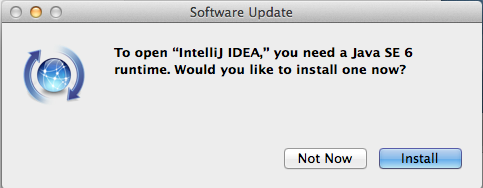
That was hard to believe. I had 7 installed. IntelliJ is reporting the version it needs to run itself, even though the applications you are developing wouldn’t have to be 6. Personally I thought this nuts as most places are sunsetting Java 6.
The solution is go to Applications->IntelliJ IDEA 14.app->show package contents. Edit Info.plist and change “1.6” to “1.7”:
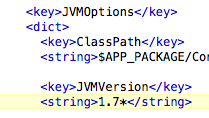
Now it runs on 7.
IntelliJ, java