My Current Developer Setup August 2014

I’ve tried my hardest over the years to simplify things, but tools are tools.  A developer’s existence is tools.  When I think about it, sometimes the paradigm is like a good cook where less is more; for instance some people like using 1 IDE for everything — SQL, Java, Javascript.  Although I do cook like that (a good knife does almost everything for me) I kind of stopped doing this as long as the tools are lightweight.  For instance, I can’t use the Springsource Tools version of Eclipse it is too heavyweight and interferes with my other plugins I like to have many times.  In that case, I am more like a mechanic where a specialty tool brings home the bacon.

Also, I always have Windows and Linux around even at home.    So here’s what I’m working with now.

Two Development Boxes

  • Fedora 19 with Gnome 3 (one Swing project)
  • Windows 7 (three projects, web services)

On the Fedora 19 Machine

IDEs

  • IntelliJ 13 Community – is my primary development environment. I need the superior search utilities because the Swing project is massive, at least 1/2 million lines of code.
  • Eclipse Juno – because the rest of the team is using that; I have to keep the environments up to snuff.
  • Gedit

Languages

  • Several JDKs 6 & 7, 32 and 64 bit. I run the Swing app in 32 bit (per requriements) and run the IDE’s in 64 bit.

Tools

  • Maven

Repository

  • Git
  • GitG – for a gui. I always eyeball my stuff before checkin.
  • SVN

Data

  • MySQL and Workbench

Network

  • Terminal
  • VNC

Servers

  • JBoss 4.3.0.  Yep.
  • Apache

Browsers

  • Midori
  • Chrome
  • Firefox

Office

  • Open Office

On the Windows 7 Machine

IDEs

  • Eclipse Juno for one project
  • Eclipse Kepler for the other projects.
  • Notepad++

Languages

  • Java — same thing with the multiple JDKs.  Plus, Windows is nasty about its own installation.
  • Groovy
  • Scala
  • PHP
  • Python
  • TCL
  • Perl

Tools

  • Maven
  • Visual VM
  • Gitstat
  • StatSVN
  • KeepFocussed
  • Cobertura
  • KDiff3
  • Portable Apps
  • jSimpleX

Repository

  • Git
  • TortoiseGit
  • Git Gui
  • Svn
  • Hg

Data

  • SQLite
  • SquirrlDB – a jdbc sql gui
  • DBeaver – another jdbc SQL gui

Network

  • MobaXTerm
  • VNC
  • Fiddler
  • Putty
  • Wget

Servers

  • Apache
  • Tomcat
  • Jetty
  • HFS
  • NGinx
  • NodeJS
  • JBoss
  • Jenkins
  • Gitblit

Project Management

  • Fossil
  • Kanboard

Browsers

  • Opera
  • Chrome
  • IE
  • Firefox
  • Safari

Office

  • Microsoft Office
  • Microsoft Outlook

Notes

  • I always zip up my IDE setups for backup and quick sharing/replication if needed.  Also, I find it best to work on a project with its own IDE especially with Eclipse.  There’s always a different team with different preferences, so its almost unavoidable.
  • I always portablize my JDKs. Can’t stand it when a JDK has to be “installed” and I have no admin rights on my Win 7 machine now anyway. Lot’s of pathing.  I have everything set up in both operating systems so I can use paths to solve problems.  None of this installation stuff if possible.  Even Linux distros are getting too “instally” for me these days.

I do not use the Spring Eclipse IDE or any other monster-plugin collections. I prefer as slim an IDE as possible. That said I use these in Eclipse, and install like ones as needed in IntelliJ.

  • M2E for maven
  • EGit
  • Anything SVN — the connectors for this are still a pain in the backside though
  • Eclemma/Cobertura
  • MoreUnit
  • FindBugs
  • CheckStyle

The point is to be able to write, generate, and test code and do analytics on it as fast as possible.  Also, I prefer external servers for debugging vs. the internal Maven-pom style server plugins.

More configure = good.

Vanilla from box = good.

Ciao for now.


TechPM Stacks On The Developer Scale

I think I’ve finally found the nicest balance of smaller scale support servers since XPlanner.   It’s taken almost 10 years. XPlanner was the old php-based X-treme project manament web tool used almost exclusively by developers (IMHExperience). It had sprints in it, and even pair tracking.

You might think management has taken over all the Agile/Lean roles and the toolsets behind them. But it hasn’t gone that way completely because someone has to have a need for them — development — and someone has to develop them — development. Across the industry you’ll find every team has an in-team method of tracking software tasks, code, build jobs that fits the dev team’s needs. This will interface with the organization’s decisions on how to manage software at a higher level.

A good example of this are localized kanban boards. While web software like Version One, Greenhopper, Redmine, Trello — etc. — have come on the scene, something happens when you move the scope of the data to the department or organization level — it becomes less useful to the task people. So there are still the old school post-it boards everywhere, with columns ranging from 3 (backlog, in progress, complete) to several that may indicate such things as the path of software through BA’s, DEV, QA’s to release or even environment deployments as well as story and bug status.

My concern is with development.

Usually I have two scopes that are often not met by organizational software:

  1. Tracking my own work for myself.  (We all work and problem solve differently.)
  2. Having a team-level tool that is not under the purveyance of management.

A Team Support stack will include these:

  • Repository
  • Tech Wiki
  • Versioned Shared Document server
  • Defect Tracker
  • Project Tracker
  • CI Server for building and deploying

I have built these in stacks — tried them on Amazon servers, made VMWare stacks –etc.  I’m looking right now at something called Docker from Opensource — to deploy applications and recreate these stacks.  But dang it the targets move so fast now-a-days.  Even my Fedora development box askes me to update almost every other day.  No easy task — so a decision now has to be for the future too with a team.  I’ve worked with SharePoint, VersionOne, Rally, Jira, Greenhopper, Confluence, MediaWiki, Drupal, WordPress, JSPWiki,  Team Viewer, most of the Rational products, Git, SVN, CVS, Hg, Darcs, TFS, VSS — even that old proprietary repo IBM used to bundle with VisualAge.  I’ve been on teams where we built our own CI servers straight up to now with Jenkins — and would have to look at my CV to even remember half the things I’ve had to use in this space.

Yes,  anyone who things management of software development is cut and dried has probably been at only one company.  But I can’t imagine even now everyone isn’t dumping SVN for Git, or grabbing an Agile project tool.

Finding a perfect stack for team support servers is not an easy task. In my most recent use case, we had off-site developers who finished up their job and were off the project. We needed to reproduce their Git repository and Hudson builds, but no accommodation had been made for the SVN and Jenkins used at our organizational level. So I built a server that had Git, added an electronic Kanban board called Kanboard, and initially a Jenkins server to transfer build jobs (but since we had a git-svn migration procedure eventually did not need this). Running on a Fedora 20 server someone set up for us rather quickly,

Therefore I currently  and *highly* suggest a team setup of:

  • GitBlit
  • Kanboard
  • Jenkins

This will give you repository, build, and tracking capability.

For my own local I run the following. These are not team requirements and I’ve done mentoring to get other team members here as well.  And I’ve learned a lot from others too:

  • Fossil
  • Kanboard
  • Git-SVN in front of all our SVN repositories.

Yes, my OWN local.  Don’t you manage your own work?

Fossil is a really cool tool built by the guy who invented SQLite. It has my own wiki and a bug tracker in it. It also has repository capability — I am trying it out, alone, a good solution for a small project now. Honestly though the lightweight wiki is the best part.

I use Kanboard to track my other stuff because the HTML5 gui is awesome. Now that I’ve gotten better at Git (I love Hg too — there is a bit of an overhead to learn to use these and its advantageous to work with people who know the recipes that work) — I just use Git, its too damn easy to use.

GitBlit gives your team immediate web repository centralization and presence, and is as easy as pie out of the box to use.

And these days, a rudimentary setup of Jenkins (or Hudson) is very simple.

Ease of setup is key for these smaller scale setups. I am not as concerned with infallibility or security. But every level of detail needed (security setups, build complexity, people to maintain etc.) adds another factor or complexity to maintain — which is why departmental stacks like this need build masters.

But at the heart of it all, Java developers *are* the build masters, because we develop the builds. Configuration is half of my job. These tools make it easier and multiply my output and let me get down to some real fun stuff. Of course, sometimes doing all this IS the fun stuff. 🙂

XPlanner still seems to be under development, at least from viewing on Codehaus and Sourceforge — it looks like the last update for that project was April 17, 2013.

ECTech Meetup July 16, 2014: BigData Techfast

For the most recent ECTech Meetup meeting this morning was a quick breakfast techfast (and I was running late) and thoughts about big data and NoSQL databases.

Consensus seems that everyone wants to use a big data engine, but no one can really find a reason to.  Reasons cited:

  • How to integrate into existing applications?
  • Reporting?  Still seems a need for reporting and A SQL style query language.
  • What are they for compared to relational databases?
  • Forays into new tech — a business has to benefit, are there benefits compared to say PostgreSQL, SQLite, MySQL or commercial solutions?

From my standpoint, I shared that I had only worked partly on two big data engines — MarkLogic, which we used to store XML data, and Hadoop/MapReduce — but years ago and only for a month or so.  If you count EDM servers like Documentum, Daisy or Alfresco (documents + metadata) I have worked on those extensively.  Is Lucene a type of big data engine?  I’ve worked on that for caching as well.

Others seem to have more experience on Mongo and we all have an interest in Cassandra as leaders pop up in the field.

Uses — caching (scalability/speed).  Data-noncofofrmity.  taht’s about all we could come up with.  The tooling didn’t seem to quite be there from our experiences.

So anyway, all that over an egg mcnuthin’.

Gitblit Duplicate Repo Bug

Logging this because it was kind of difficult to track down.

We have a Gitblit instance running for our developer repository on a Fedora machine. It really is a wonderful tool; up and going practically out of the box.

But one of the problems we have been having is that duplicate names for the same repository show up in Gitblit on occasion. The code doesn’t seem to be affected; needless to say it’s annoying.

I noticed this happening when we got someone new on the project. After sitting with a developer I observed that they weren’t using the correct URL to clone and push to the repository; which resulted in duplicate repository representations in the Gitblit UI. You might see “devteamrepo” and “devteamrepo.git” — same repo but reported as two different ones. Generally you check out th e.git repo, but in Gitblit is lists without the suffix.  Note that Gitblit needs to use bare repositories, which can probably create a confusion for people typing the URL.

In short — it seems trying to push with an incorrect URL or incorrect permissions can cause this duplication.

If you look at the actual link for the repo in Gitblit, you need to use something like this (found int .git/config — this is correct):

[remote “origin”]
url = http://<userId>@<server>:<port>/r/devteamrepo.git

A lot of times people leave the /r out — which can create a clone-only situation so be careful.

I dug some in the Gitblit boards and found two issues that suggested when a person accesses Gitblit incorrectly, another cache is created which creates this situation. Here are the relevant entries:

Issue 150: Authentication failures create duplicate repository listings for Authenticated Push repos.

Issue 140: Duplicated entries in the web repository listing.

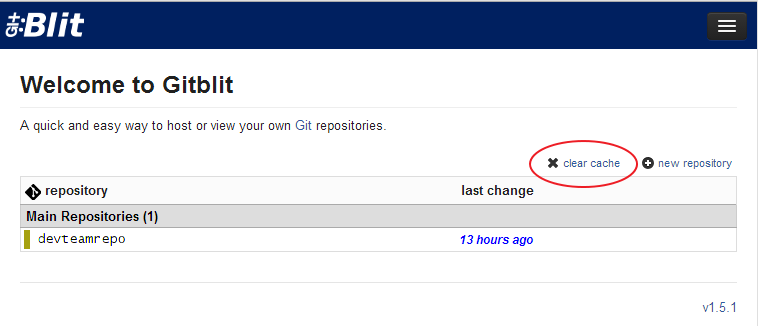
The solution is to log in as an admin, go to repositories and click “clear cache.” That fixes it.

Not sure of any other implications for this solution yet, but am keeping my eye on it.

Things you just can’t fix no matter what repository you use

Bad Developer!!!!!!

I was working with an “expert”. He was working on a major refactor that was going to break several hundred of our tests.

Now, probably the best way to do this with ANY repo would be either to branch and make the change, and then do the fixes and merge when it was all good — or just not check in at all. Just stay away from everyone else’s working code!!!!!

Well guess what — the expert made a big boo boo. HE WAS SUPPOSED TO BRANCH DAMMIT BUT DI’NT!!! He did the code change and then did his incremental check in, and proceeded to push ALL the test breakages to the main trunk!!! Well, we didn’t have a Jenkins job running on our trunk to check it (we used git svn, and the job ran on svn/Jenkins while we had our skunk works).

Seeing where this is going? Right. Now the team all checked out and rebased to the breakage. This cost us several hours as a team to resolve. The expert was quite sorry, but also blamed it on no build check. I’d have more sympathy if that particular person wasn’t the one who was the repo nazi for our team. Tsk tsk.

I also ran into an interesting situation.  This error had messed up a lot of my local changes.  Although I’m in the habit of stashing before I check out, I don’t build between checkout and applying the stash  — and then I usually stash pop in the prescribed manner which generally blows away any hope of reapplying the stash again.   Fortunately I had an OK stash I could use, and rolled back before these errored commits came in. Then I branched – which in effect made my branch the trunk while I waited for the fix.  Applied my stash into my branch and continued until the guy fixed what he had.   I could have branched his stuff, checked it in as a remote branch, and rolled the master back but I decided not to out of respect for him to fix his error.  There were some messy merges along the way with this, very time consuming.

There are some very important things to learn working with these distributed repos.

First, a build server is a good buffer for monstrous breakage. But . . . in this case we were all pulling quickly as we worked (me and another developer swapping code changes) so we weren’t waiting for the builds to check out. Do you wait for a good build before checking out? What ensures you didn’t get something in between the build and the result? Nothing . . . . even on a locked down TFS system some years ago we still ran into this problem.

Second, no matter what greater deity of code you may be, you are fallible. Check yourself over and over, more than a monkey looking for lice in its fur.

And third — distributed repos haven’t solved this problem at all.

A new workflow could be deduced from this:  build,stash, build,pull/rebase, build, stash pop,build.  hahaha  🙂   Also, we could all start getting that nervous Ctrl-S tick I have back from the 1990’s, but manifest in git stash over and over.  I do increment commits which require builds — but this behavior also raises the question: should we *even* increment commit if our local build doesn’t work? It could create an accident such as this.

And what if your build takes a LONG time?  Such as the TFS worksite — upwards of 25 minutes with integration tests!  Sweet Fancy Moses . . . .

I suppose one way to fix this would be to pull the revision from the last greatest build. Maybe something can be configured in Git or Hg to do that? Dunno.

A Git Recipe For Going Back In Time

The one thing I REALLY love about distributed version control is the ease of branching. There is nothing like it. If you are currently on SVN you know what a pain it is to check out another branch and switch your workspace over, or (gag) try to roll back your local. Not so wtih Git or Hg. Another thing I love is the simplicity to roll back to a previous pointin the code. Super easy, almost zero time.

QA found abug in our code that was assigned to me with these conditions:

  • Bug in QA deployment (released 2 weeks ago)
  • Bug in DEV deployment (questionable release date)
  • No bug in my development machine code.

I couldn’t pinpoint any relevant fixes in the code with a ton of developers checking in on the same files and it looked like DEV code hadn’t been released since QA although the build engineer couldn’t answer that for me.  I dug through the build numbers and it made me more suspicious.

Perfect scenario to branch, rollback, and test. So here were the steps I took from the command line:

1. Made a branch to work in:

git checkout -b oldCodeBranch

2. Check the status to make sure I’m good, and on the branch:

git status

3. Listed the commits so I could grab a commit hash to roll back to:

git log –pretty=format:”%H %cd %an %s”

4. Roll the branch back to the hash, discarding any future changes:

git reset –hard f8b720b2a3

5. Build

mvn clean install

6. Debug

A variation on steps 1-3 if you know the hash (maybe from Tortoise Git; still trying to figure out if Gitg is useful):

git checkout -b oldCodeBranch f8b720b2a3

So this solved my problem:  the bug was fixed but not yet deployed.

I found the error right away; and that the DEV environment build hadn’t been released since the QA release (grrrr what’s the point of DEV then!!!). Then, switched back to master in the blink of an eye and deleted the branch. The speed at which I could accomplish this in Git with such little pain is awesome. Plus, for this particular project I am using git-svn to front the SVN repository, but once I get the code it is *all* in git-land until I push it.

I want to stress something here: the speed an ease that I accomplished this task, compared to something like SVN.  Until a developer goes through these mundane daily tasks they can’t appreciate it and I do, now.  I really encourage using something that lets you branch and change around in your system with ease be it Git, Hg, or anything else.

Must have . . . LinkedIn?

Check this line out I received from a mouth-breather blindly spamming developers:

Ideal Candidates will have REST or RESTful web services, Spring, Linux OS and a Linkedin Profile.

Woah.  Since when did having a LinkedIn profile become a necessity for being a developer?

More companies are coming out with pre-screen personality tests, requirements to obtain your contact lists and social media requirements — for instance something I mentioned before, where a company said it owned any contacts I made while on my gig — phone, email, social media.  No shit.  I didn’t sign any of that.

Jeff Atwood, Co-founder of Stack Overflow, opted out of LinkedIn years ago questioning the benefactor of such a site.  I have an account but I barely use it.  I do know some, very few, developers who *have* benefited from LinkedIn; and many are on Google+ now.   I also know that recruiters want access to contact lists and have reports they run on LinkedIn data to see if positions open up or companies have activities that may indicate sales opportunities.

I certainly am not hooking up just any strange sales person to my linked in account even if I had 1000 job leads.   For years I’ve gotten spam out of the blue to hook up with strangers on LinkedIn.

Most of the developer groups I’ve seen on it are started by recruiters;  if they throw an event it would be best to show up to this in person and network in person.  That’s how it works for me.

Anyway, I see this as a major “data mining” flag when a company emails out a LinkedIn requirement.  Although it doesn’t say you have to network with them . . .and I wouldn’t.


EC Tech Meetup June 4, 2014 – Build Engines And Lessons of Open Source

EC Tech meeting for Build Servers went with a hitch as I tried to get a BigBlueButton server up and going for collaboration. This software is open source meeting/record software, but as with all open source the price to pay is with time and inconvenience.

Two things that take a lot of time to do:

  • Full documentation
  • Full automation

We often have arguments about how in depth to document something. Audience is a key factor. But I think, to really get the “open source” ribbon you need someone besides advanced developers and admins to be able to use the stuff — that is, issuing api’s out of the box to create a new meeting session is, IMHO, a severe usability problem.

Big Blue Button isn’t there yet. It’s good stuff and I will use it because I paid the price, but its not there and I fear for its longetivity. For instance, in order to create new meeting instances you have to be able to understand how to execute a web api command. This sounds simple for developers — but for a regular user? The command has to include a checksum value that a user has to generate and the documentation is written pretty poorly. I went down this road last night: downloaded the software just to find out you needed to either run it in a virtual machine OR only on a version of Ubuntu.

This explains why, when I asked two professional instructors from Awesome Dudes and Euler Solutions in the Twin Cities, both balked at my meeting software requirements and said “its not trivial, us Google Hangouts.” So I finished the meeting up like that, but didn’t get to record anything.

——

The meeting was finished up at the Tomahawk Room in Chippewa Falls with a Google Hangout. I only managed to spike a Maven archetype creation of a Spring/Hibernate application, so this topic may be swung back to do again. Buildr is intriguing to me and I’ve used Gradle in some tutorials; a lot of people talk about it.

Now one thing I would like to discuss is why developers should be using a build engine like these, even if you are just spiking an application. People will argue “well Maven is too heavy duty.” Etc. I would argue that its necessary now to start an application like that in many cases. First, are you going to test? These systems give you the harness to do that. Use dependencies? Then use these. Dropping in jar files is absolutely insane these days; minimally use Ivy. The dependency charts and management of them for your imports will drive you nuts. These build tools automate all of that.

I do simple tests in a simple Eclipse project sometimes using JUnit as my “main.” But for doing anything else I start with a build tool. Groovy has “Gant” — a wrapper around Ant for its base, and using Maven is simple enough. Scala works well with SBT or Maven.

You get with build tools:

  • Goals for different stages in your development: building, testing, deployment etc.
  • Directory structures
  • Base application soup broth(for starting out)
  • Integration into build servers/build from command line = Automation
  • Dependency management

These tools make life way simpler.

Arguments For Distributed Repositories

So — you are using distributed repositories (DRs) like Git or Hg.   And you are thinking — why the heck use branching?  Branching is great for local one-offs but I can copy/paste for that!”

I admit that I have struggled with this questions as well — for instance thinking that SVN is just as good of a tool for developers.  IN the beginning people pushed these DRs but we never, ever used them in the manner that they were intended; they were just shiny new toys.  Some of us, me included, took a lot of guff for not being the earliest of adopters.  After a lot of hands on over the years, working with these repos the correct and incorrect ways I finally have solid arguments for using distributed repositories, especially when it comes to branching.

Note this is *not* in any way an anti-SVN post; that repo has great tooling and was revolutionary when it came on the scene.  You can even use plugins like git-svn with some success in front of a central SVN repository; and in many ways I find build masters preferring its branch and tag methodology.  But I would argue that from a developer’s standpoint a distributed is tough to beat.

  1. Fluidity
  2. Ease
  3. Sharing
  4. Functionality

Fluidity

For me the definition of fluidity is how much something aides your development process.  A DR seems in the way at first with the double-check in steps . . .check into your local, check into your central.  But once a developer sees the advantage of the local repo it becomes much easier to create batches of changes locally and then push them up to the central repo.  (Central repo is usually where the build server points and everyone agrees to push to).  DRs accept the merge bumps we all run into and make it part of their process . . . so development becomes something with less in the way.  You can worry less about the checkin  process.

Also, their is the speed of creating and switching between local and remote branches in a DR; uber-fast.  This alone in hands-on makes these tools worth it.

Ease

Have you ever had to work on a branch in SVN? Check out the whole thing and switch workspaces with your IDE — what a pain.  With Git (for instance) I just issue a git checkout branch and nothing else needs to be done. That’s as easy as it gets.  Adding and committing are all as easy as any other repo.

One thing is with RVs is that it’s also *easy* to get into trouble with merging and getting code out of sync.  These systems are more sophisticated so that’s part of the problem.  Git has the merge/rebase  wars, and a lot of time in Hg and Git you’ll see unintended branches pushed out by new users.  This is OK, it takes a while to learn.  Make the learning process easy.  All too often I see an experienced person blowing up on a newb forgetting that they too usually can’t write documentation and probably made the same errors.

But — the flow makes you do small commits; this in the long run helps keep you out of trouble. Easy!

Sharing

Remote branches are SO simple with a DR.  Since they store their diffs much differently — and SVN has to create whole new copies of directories, the speed is so slow comparatively.  Team members can share remote repos in seconds, and with Hg and Git you can fire up local servers in your local directory for sharing right away sans central server.

If you sit down and work with the tools — SVN, TFS vs DRs it doesn’t seem obvious off the bat how this might work.  I have some use cases below that, when you run into them can immediately see how useful sharing becomes outside the central repo; it is very powerful and not immediately obvious to non-coders as to why.

I mention this because often non-coders get to pick the big tools: people like management, paper architects, PMs and build masters, maybe even QA.  Their input is important, but as a developer not always relevant for *doing* the work.  I guess that’s why there is git-svn as a compromise and/or transitional tool.  Sometimes newer management and QA tracking tools, Rally for a while, only worked with more legacy repositories like SVN and TFS.

Functionality

I am a combination command line/UI person.  For instance, I always make sure my build scripts can run on the command line (as will the build server) and in my IDE which is usually Eclipse, sometimes IntelliJ.    You can get intra-build errors that are difficult to debug if you don’t master this.  With a DR — you simply get more tools.  The command line options for Git are endless; I love the interactive staging UI on the command line (git add -i); I also use Tortoise for eyeballing all my files, it lets me add/commit at the same time; the log and branch viewers are fantastic and picking out commits its simple.  The amount of commit history is great as well.

In fact DRs really make you think beyond coding as to how you push forth your code.

Some Workflows

Commit types: Build masters and managers are more concerned with feature pushes and rollbacks on a macro level; developers with micro commits and history.  I find DR tooling makes this workflow much simpler.

Branching: A lot of times when there is a large test suite and a refactor or major requirement change must go in a lot of those tests and other code will break.  The main build must not break.   The best way to handle this, with ease, is to use a Git or Hg branch; make your changes while consistently merging trunk into your branch; anyone can work on it as well.  Fix everything, then merge back to the trunk (after a merge from trunk of course).  This is one of the most powerful and easy to do activities with a DR.  You’ll know it when it happens to you.  Many times you can do this by yourself with SVN by just not checking in and making updating from trunk; but you don’t get the ease of branching or the ease of sharability.

Postscript

Using DRs properly and leveraging the features is not immediately obvious; you have to dig in and experience it to see why they might deliver more value.  SVN and TFS are certainly very adequate; I like SVN’s integration into everything there is and I like TFS’s concept of a shared shelveset.  Many build masters prefer SVN’s straightforwardness for *their* tasks.  And SVN was certainly maligned (to CVS for instance) when it first came out.  As developers we should avoid harsh orthodox judgments and see if something will actually put forth value or if we are just doing something for newness/coolness sake.

It’s taken years to see the value for me because almost everyone doesn’t branch/develop the same way on different sites. I guess that’s the lesson.  Again, deferring to SVN which was the first repo to put out this mantra while they were still hosted on tigress.org: “We don’t provide you with a process, just a framework to do YOUR process.”  Brilliant.

And someday there will be something better anyway.

Agile Process Templates? LOL

I found this entry in a Rational Process server . . . a team that has a process template and daily meeting notes for SCRUM.

Is there any other needed proof that Agile has went off the deepend?