Opportunities to Learn

Coffee and philosophy, why not? I really miss some of the public areas to have coffee and commiserate with colleagues, since I don’t have that at my site now. If you read that recent article about Stevie Jobs — public areas breed innovation and cross pollination. I try my best.

Recently I had two talks with colleagues; the two whom sit more on the side of operations/support/development vs. myself — as I consider myself a pure developer. And two discussions ensued.

Quality Is Practice

First, pointing out that there was very little test coverage in a code base I was working on; the lack of tests had caused repeated failures in code releases because new code would break old code. What about Sonar? And Tools? Fine and dandy but —
“quality and testing are PRACTICE, not tools.” To that statement I got an “I suppose” and disbelieve. The two do not write tests for their code.

Quality Is Persistent Discipline

Second, I was asked about my development environment — java and maven questions in specificity. Having went through the effin setup grinder with development environments for over 20 years, I told the colleague how I st up. A directory with all my jdks, mavens, servers, and ides. I zip up/back up my IDE setups and everything is portable/configurable with environment variable. Even at home (and working on this in the EC Tech Meetup) I use virtual images to set up development setups.

“Time consuming.” He said. I couldn’t believe he used the network nerd installed images/JRE for DEVELOPMENT? I had worked with him before and remember always being at his desk . . .

You have to be persistently disciplined to code. In Java, over half the stuff is configuration — if you can’t repeatedly set up your environment from scratch it you WILL get burned when those network image folks roll out a security patch and wipe your environment or registry. It’ll happen.

In the late 90s I purchased a notebook computer jsut for that thing. Frequently onsite you’d be waiting a month to get set up –unproductive.

Every Challenge is a Chance To Learn

Recently I have had these following things thrown onto my plate:
-Scalable configurations
-Application security
-Code Quality

These popped up out of nowhere as issues. But, well, I don’t get to directly work on them at work so I do it in my off time. The most fascinating thing I am doing now with my work on virtualizing development environments is to do security code scans with open source software like LAPSE+. This well become more prevalent in our near future. And writing faster applications with canned stacks — faster prototype to enterprise.

If you are in a meeting and something that doesn’t involve you directly perks your interest, pursue it right now and learn something. Just spike it out. The hands on EC Meetups are all about that. Function and practice.

Test Coverage for a Void Method

I ran across some state code that had plugs in it that were operations an action listener would look for.  The code methods didn’t have anything in them, but needed to be there.  I wanted some simple unit testing coverage on them.  Here’s a small technique to cover a void method that doesn’t do too much.

Here’s the code to be tested. Notice I made 2 methods for my tests, one throws an error. I’ve included to ways of testing for errors in the attached repository code.


public class TestClassImpl implements TestClass {
   public void methodNoError() {}
   public void methodError() {throw new RuntimeException();}	
}


To test methodNoError, we just use a Boolean and flag it if there is an error, and assert that variable. The other two tets are separate ways to check methodError() which actually throws an error.


@Test
public void testMethodNoError() {	
   Boolean testState = true;	
   try {	
      testClass.methodNoError();	
   } catch (Exception e) {
      testState = false;
   }		
   assertTrue(testState);
}
	
@Test
public void testMethodError() {	
   Boolean testState = true;
   try {	
      testClass.methodError();	
   } catch (Exception e) {
      testState = false;
   }	
   assertFalse(testState);
}
	
@Test(expected = Exception.class)
public void testMethodErrorExpected() {testClass.methodError();}


You can try this out with the TestVoid project folder in my Bitbucket; just run “mvn clean install” or load it into your IDE.

TestVoid

“QA Will Find Them” — Or The Story Of Cowboy Coders And Non-Collaboration

I was on a project with a very tough defect assigned to me.  The main class consisted of 1600 lines with zeee-ro unit tests, and a McAbe index of 67.  I had found numerical/scale/precision errors in some of the underlying classes and knew the source data had fields that were not necessarily being used for what the columns were named to be.  The effort to fix would involve collaboration with the business and some of the coders who authored this beauty — as I could see from their names in the repository.The content you are trying to access is only available to members. Sorry.

EC Tech Meetup Oct. 1, 2014 Synopsis: Virtualization for Developers Part 1

It seems to me we are at this strange crossroads again for putting developers in a box, or opening the doors to allow them creative and utensil freedom. I would say nowdays, we are leaning as an industry towards less freedom and more box.

That was the feeling I got when I started to delve into Vagrant. That my control over even what text editor I use will be taken away.

For this session I went into:

  • VMWare
  • VirtualBox
  • Vagrant

VMWare and VirtualBox run images of operating systems in their own container in your installed OS.  Vagrant is a command line OS-instance manager that manages your virtualization machine — i.e. VMWare or VirtualBox.  I ttries to give you chef-like control over setting up systems.  I spent most of my time in Vagrant because I already know how to set up VMware and VirtualBox images.

Here are a few off-the-top things I noticed about dong development virtualized:

Admin Rights Needed

To use Vagrant you need to have either VMWare or VirtualBox installed. I have had both for a while. These installations are not trivial, they require admin access and restarts. So, in this world where developers are not admins over their computers we already have a strike against virtualization for developers.  Installing, let alone updating, would be a pain unless we beg permission from people who have no idea what it is we do — network controllers, managemnet who more often than not do not have development backgrounds.

Portability of Base Applications

I rarely ever get admin rights on my box anymore, and configure my Java environments to be as completely portable as possible (meaning alos I have to do a custom extract of the jdk so I can have more than one version).  Thank goodness Eclipse is unzippable.  Configured with environment variables.  I guess if you are a .Net coder, or work on a Mac, or need OS integrated tools like TortoiseGit you are SOL.

VirtualBox *does* have a portable version.  VMWare — not.  And I was quite surprised that Vagrant did not — for Windows it comes in an MSI?  Maybe there’s a way around this but I didn’t have time to look.

Size

The image sizes are pretty big. I downloaded Fedora 20 and Ubuntu 14 for all, and we are talking about 800-1500 MBs per image.  That’s without developer stuff installed.  Not, in my opinion, light weight.

Networking

If you are going to use a virtualized system as a network server, well, the networking setup can be a pain as well.  The installation for VMWare is very machine specific and puts network device entries into your system.  I would have to say this seems less secure and more likely to be exploited.  More doors, more chances for entry.

The Glitch

No matter what I used (on an i7 notebook with 8 gbs ram and a SSHD) the parasitic OSs always seemed not quite . . . fluid.  Latency.  This would derfinitely come in play for each iteration of a Dell computer at a work place; the desktop services people would go nuts debugging problems.

SSH to 127.0.0.1

I found that in-depth knowledge of networking is needed for these kind of setups.  Vagrant doesn’t lend itself to easy UI — so I’d pick the other two for a developer over it unless only needing a server.  I think that Vagrant images can be run independently by the other two, instead of the “vagrant up” command.

Overall impressions

I don’t think these systems are quite there yet; they are difficult to set up and machine dependent.  Also, having worked with developers — especially the Linux types — customization is more likely.  Trying to force developers into a single image of IDE/text editor/tools is insane.

What seems better is making a zipped distro of say Eclipse, with all the plugins etc. needed.  This goes on now.  Since most setups are one-offs, time to set up a custom computer takes no more time than an image deployment and time lost due to host os machines hardware/os updates.   Maintenance over time could be a pain.

Also — how much of the development environment should become part of the application?  The old Java mantra — develop once, run anywhere.  Well I have been on projects where the style and setup of the IDE is so strict that it is part of the code.  Formatting for instance (which can make sense, maybe, for check in comparisons).  But even Vagrant says “checkin the config with your code.”

Vagrant tries to address the problems of updates, and I would like to think that it points to some of the future.  Already I keep different development environments for each project.  Vagrant could let you do that, and do updates with script much like Amazon servers.

My worries around this process though again are the ancillary effects of having non-developers decide what goes into some centralized development image.  Java projects can get really, really complex — several network sources (JDBC, SOAP, JSON, RMI, JMX  etc.) and one slight change in that invalidates the image right away.  Honestly — how good is your team at maintaining its wiki and development images?  Mot places I’ve been aren’t because they run at breakneck speed.

I have tried to use image appliances in the past for development.  Spin up a Jenkins/Nexus/Git server.  Keep a dev environment in an ISO.  But the operating systems are all getting larger, so is the solution really to put an OS that needs an entire machine’s hardware on top of another OS?  If you could develop on Puppy or any iteration of Damn Small Linux, maybe not.   But let’s face it, this won’t happen.

I don’t see this route to virtualization happening quite yet, not until the host OS is so slimmed down that its’ become something like GRUB.  For many of my java projects, even with Maven, I’ve noticed a fatification of a lot of setup so maybe we won’t get their yet.

Still, there are some good ideas.  Scripting images (chef or whatever), portable environments.  I am still chewing over the idea that the dev environment is part of the code/production itself.  It’s a very good idea just not sure how it should be manifest because I’ve been on that bad end of that too.

Also, the idea of Vagrant is a good idea much like yum (etc.) — command line updating and configuration.  Then it can be scripted.  I think the best option now would be managing configs with Vagrant, whilst using VMWare/VirtualBox to directly run the image after that to get easy access to the UI.

Next meeting we will go into this a bit more, hands on.

By the way, part of the intention of doing the virtualizations is as prep for making portable development environments for our upcoming stack development sessions.  I will most likely be using a Fedora/Gnome image on VMWare Desktop for myself going forward.

JOptionPane Popping Up During Unit Tests

This story is the story of good old fashioned decoupling, and an example of Java’s Bridge and Adapter patterns.

My client has had a piece of code that for years, yes years, was popping up a java Swing JOptionPane message dialog during unit tests runs in Eclipse (via a Maven plugin) and Eclipse’s JUnit runner.  The surprising thing is that all the developers would tolerate this . . . and all the developers would run their builds inside of Eclipse.

The codebase sits on SVN, and I’ve been running git-svn infront of it and using the command line quite a bit.  My builds have all been terminal-based Maven or a build script also run from the terminal. For whatever reason I couldn’t pin down — maybe a global suppress warnings — I wasn’t getting the dialogs.  But I *was* aware of the problem because I make sure my stuff runs in Eclipse as well. So I logged it in my Kanboard database and came back to it.

The solution was a bit simple, just bury JOptionPane in another interface layer.   I had thought about it, then researched soloutions regarding Swing component testing (seriously how many fat clients do we Java people write these days?).  Lot’s of static methods and I haven’t finished dropping in PowerMock and its module for Mockito yet. I followed the bridge/adapter path written up by Shervin Asgari and thank him.  The technique is fundamental enough, and overlooked enough, that I feel compelled to write it up here.

Inside some of our service code is this pop-up for an error:


//Service code
public void codeMethod() {
   try {
      //...something and maybe error
   } catch (Exception e) {
      LOG.error("Service exception: " + e.getMessage(), e);
      JOptionPane.showMessageDialog(null, "Service is broken.  Contact help support", "", 
      JOptionPane.ERROR_MESSAGE);
   }
)

Again the problem is, when running JUnit tests via Maven *in* Eclipse or via the Junit runner, the pop-up shows and requires response. We don’t want this for obvious reasons.

Unfortunately this Swing widget has a lot of static methods so we can’t simply extend the class with an interface and mock that interface. The solution instead is to make an separate interface and implementation, calling the JOptionPane methods.

First I make an interface and a concrete implementation, the latter which executes the JOptionPane method:


public interface OptionPane {
   public void showMessageDialog(Component parentComponent, Object message, 
   String title, int messageType);
}

public class OptionPaneImpl implements OptionPane {
   public OptionPaneImpl() {
      //intentional
   }
   /*** we have moved the code from the service to here ***/
   public void showMessageDialog(Component parentComponent, Object message, 
   String title, int messageType) {
      JOptionPane.showMessageDialog(parentComponent,message,title,messageType);
   }
}

Now we put the code into the service, and we are ready for mock testing:

//Service code
private OptionPane optionPane = new OptionPaneImpl();

public void codeMethod() {
   try {
      //...something and maybe error
   } catch (Exception e) {
      LOG.error("Service exception: " + e.getMessage(), e);
      optionPane.showMessageDialog(null, "Service is broken.  Contact help support", "", 
      JOptionPane.ERROR_MESSAGE); //<-- swapped the interface into here
   }
)

Here’s what the test looks like with JUnit/Mockito:


public class ServiceCodeTest
{
   @InjectMocks
   private ServiceCode serviceCode;

   @Mock
   private OptionPane mockOptionPane;

   @Before
   public void setUp() {
      MockitoAnnotations.initMocks(this);
   }

   @Test
   public void testDoCalculate() throws Exception
  {
     //comment out mock declaration and following stub to see message dialog
     doNothing().when(mockOptionPane).showMessageDialog(any(Component.class), 
     anyObject(), anyString(), anyInt());

     serviceCode.doCodeMethod();
  }
}

There almost never seems to be a reason *not* to use an interface. At worse you just write a few extra lines of code but the decoupling, extendability and testability are invaluable.

Give Me That Old Time Tech Policy

Do you like beer? I do. How do you like the amount of selection on the market now? It’s awesome isn’t it? It wasn’t always like this because the screws were tightened down on small and home brewers for years and years. Small timers, in my opinion, simply weren’t trusted with making beer; and in America these laws dated back to the 1920’s and Prohibition. Once the regulations were dropped (over many years) we entered this golden age which has made all of our lives better. Here in Wisconsin and over in Minnesota is an unbelievable cornucopia of great new local beers and a remarkable increase in quality of life because we became free to pursue brewing, distilling and wine making. Myself, I’m just a beer acceptance tester. But a good one.

These days in development we are starting to see a tool prohibition start again, and the power of innovation taken out of ours hands. We aren’t allowed to be admins on our machines, to be trusted to freely search the internet for information — and in some cases cut off all together. We can’t use the tools or improve the tools we need and all of this is hurting the industry and stopping innovation. All in the name of security.

There has been a huge bleed over of reactionism from the Target and Home Depot security breaches. And it is my opinion that the manner that security is being addressed is in part incorrect. Stopping innovation, throwing up a Berlin Wall for developers will not, in any way, help your company.  Security is important, oh yes.  As someone who has had a lot of HIPAA training, and in my beliefs system, I am well well aware of this. But some things are inconsequential and wasteful.

We had Tech Prohibition in the 1990’s before the big breakout of last decade. For instance, I remember  working  on a retail site (in a very large company) that needed a lot of graphics work done, and that task fell on my shoulders to do it in addition to the java/css/html. I had to use Microsoft Paint to do the image work — that’s right — because the company would not give me a proper image editor, let me install my own, or even bring a notebook in with my own Photoshop, do the edits, and transfer them to the project. I cannot tell you the amount of time was wasted using that crappy tool for such a task. It took years and years for many companies to *trust* developers to do their work with the tools they wished. The result was the productivity increases we saw, to some extenxt, with developer initiated XP, Lean, Agile movements and the development of CI and extensive developer testing tools, among other things. An explosion.

I can’t use any of these on one of my gigs . . . .

Now to be fair — I can’t say that some developers aren’t at fault. I remember when I first started running into the dynamic languages in the mid-2000’s: Python, JavaScript, Ruby, PHP, Groovy etc.  a lot of the sentiment started rolling towards doing work directly out in production.   The languages, especially one’s like JavaScript and PHP, lent themselves to doing quick fixes without doing a big build/rollout process like Java.  But even now the JavaScript people are learning that maybe a compile process isn’t such a bad idea for many reasons besides a dev/production buffer.

Maybe the movement was to get the stodgy old processes out of the way and make way for “Agile.”  Man are there a lot of different interpretations of that word and that was one of the worst ones; the other being “change business requirements in the middle of sprints.”  I guess we could talk about that in depth.

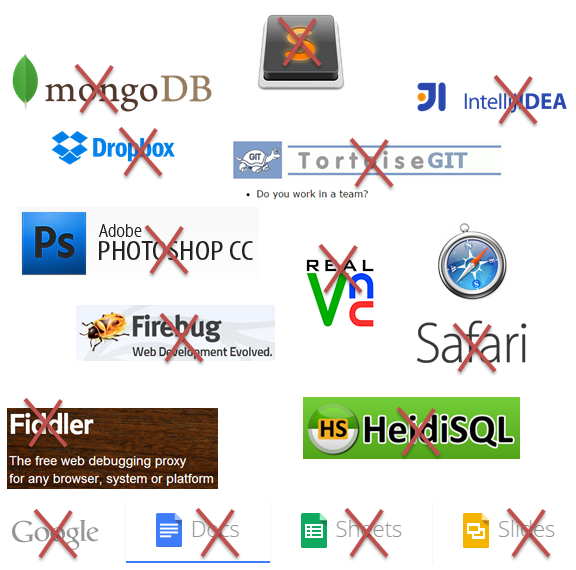
Anyway — having to call the help desk to install a Tortoise upgrade?  Or to get IntelliJ?  Or having them question my choice of a screenshot tool . . . or even a text editor?  It’s coming to this.  We have our Jenkins server logging us out after two minutes, and if I set up a tray monitor it breaks my Active directory/LDAP login and I get locked out.  Is this really the way to conduct a development shop?

Blocking any of these tool choices won’t solve a thing.

What can be done is:

  • Isolate the development environment completely from production.
  • Keep your production data safe as heck.
  • As a developer, do not get production access unless you absolutely need it.
  • As an organization, separate your development people and your support people; they aren’t the same anyway.
  • There are tools that do security checks and software licensing checks and everything else — use these.
  • Why not just have a reasonable guest network in house?  If McDonald’s can have internet, can’t a tech department?
  • As a developer, behave in a professional manner so that there can be no “trust” issues/incidents.  For instance, don’t hook your phone to your computer, don’t bring in USB keys, etc.

What I am doing now is lugging in a separate computer for my stuff now, using tethering from my phone access  — for PM management stuff, Dropbox stuff.  My Fossil and Kanboard and Google Drive things.  I have no choice.

But it’s all too bad now isn’t it.  Such a waste of time.

Making Asynchronous Release Schedules Easy On Your Development Process

Once upon a nightmare a project manager said to me: “I would never let developers work on trunk.”

Serious?  It turned out the organization had *redefined* from industry standards the definition of “trunk” — to them it meant “production release.”  Ummmm.  Ok.

I explained why the concept of trunk is that it is the most advanced rendition of the code, that development is always ahead of production and that production is just a release of developer code.  No matter how you look at it this is the truth, even if you do hot fixes or patches in production (which should be patched back to development or forgotten with production that becomes a dead end branch.)

The repository is there to support development.  Part of development is release.  If the philosophy is the converse:  repositories are there for production release and developers-be-damned I can guarantee you rough seas.

Two scenarios I have worked with that deal with extreme repository interesting situations:

  • Divergent Branch Problem: A branch that diverged with trunk so far that it went on its own release schedule and eventually became its own product.  You see this kind of branching in Github all the time. If this happens, and an organization is still under the delusion that they have one product its too bad — but the behavior of the team will be supporting two products.  Solution:  drop your delusion. You have two products.
  • Asynchronous Features Problem: In this case the teams have several features coming out but no one knows which will be released first.  Solution:  Make branches and merge back to trunk often. Have build servers on all branches . . . and read on.

The Asynchronous Cake Batter

We had two competing Features, A and B.  The features were to be released separately, the first one exclusive of the second feature’s code but no one knew which would be the first to be released.  Got it? Parallel timeline.  AND. . . they had all the developers on all features checking into the same common trunk.  Oh yes they did.  Eventually the “build master” would do a reverse merge in trunk when a build was needed.  using check-in tags to could identify what to pull out, and create a release from what was left.  That’s right — a reverse merge.

Pause.

A “reverse merge” is pulling code out to create a build with the intention of putting the code back again.

OK, now that you’ve wiped the Dr. Pepper off your screen from your guffaw, and believe my I couldn’t believe it either, nothing would budge them.  They wouldn’t create dedicate branches — indeed, even using SVN they could have, and none of the teams were really sure what a build number meant out in QA.  You’d get build 456 and say “hey. . are you testing Feature A or B”?  Only the build master knew from the edict he received from management.  Yeah, our QA systems were testing both at the same time on the same systems.  And services were going out too — so sometimes a Feature A client would be operating on a Feature B service.

And the worst part was the releases suffered from cake batter syndrome — that is, once you’ve put the eggs and sugar into the batter and its baked you can’t get them out again.  Reverse-merging suffered from this: the resultant code was nothing nobody had created.  And . . .the build masters didn’t work on the code at all but they had to do this complex merging.

My Solution

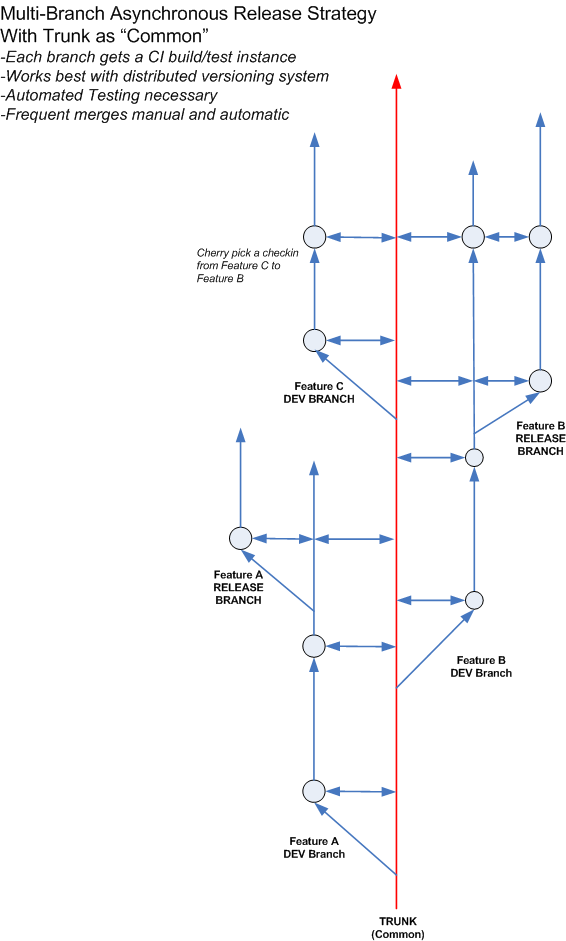
I was able to manage things my self locally with git and git-svn for our respective repositories.  After hands-on with this I came up with the solution in the following diagram.

Asynchronous Release Strategy


The features are branches where the developers work.  The pain comes in merging back to trunk, but doing so ensures that a future branch gets all the previous features.

Discussing this solution with a few outside that particular culture, this makes sense.  Hg or Git really go a long way to help this.  A developer can switch easily between them.

Also — very important — is the merge back to trunk from the branches.  Now who does this is up for contention.  A merge requires builds and tests and can be time consuming.  My suggestion — automate the merge back to trunk on developer check-ins and run the builds with automated testing.  A breakage means a peal off.

I really think you need three ingredients to do this kind of development — or be ready to descend into the hell we experienced:

  1. A distributed repository that makes branch creating and switching a snap — like Git or Hg.
  2. A build server with a crew ready to clone build jobs for the necessary branches (minimally the mainline trunk and feature branches).
  3. Automated testing — to ensure that nothing breaks.
  4. Frequent and often merges

I cannot suggest this kind of management paradigm that creates this scenario — even with the solution I put forth there is considerable pain in the merges no matter what a person can do. Double check-ins have to occur somewhere when an organization decides to do this, but its better than the dratted reverse-merge.

Suuuuuuure It’s A Success — Because We Said So

Waiting on a delivery from UPS/Sears, I was notified via email that the delivery would be late because of a train or trailer delay.

Not a problem for me.  Almost every place, except Amazon, is a maze of deciphering to figure out just when something will arrive.

This status on the UPS site hearkens back to *so many* projects I have been on where failure was declared success.The content you are trying to access is only available to members. Sorry.

IntelliJ EAP 14 and that darn Mac thing again

I use a commercial version of IntelliJ when I am not using Eclipse (who’s newer Luna release is very, very good).  But doing Grails, I need that version of IntelliJ since community doesn’t cut it or I get relegated to the command line.  I still use my 11 version, as 12 was too glitchy and now that 14 is getting ready to come out soon, don’t need 13.

Digging through the comments on IntelliJ EAP 14, I ran across this comment:

Right.  We *always* talk about this, how difficult it is to work with Java and Macs.   Sad shame.  Java 6?  Wow.  This has oft been the poison pill for me and Apple computers. Now I am using Java 7 for this early developer release 14, but a classic problem with Java and Mac is to be locked into a Java version.  Makes it very difficult to work on several different projects on the same machine, let alone new technology.

Anyway, I will be testing this new release and purchasing the upgrade when the time times.  You can test it too, here.

Spring MVC Truncating Path Variable IP Address

Ran into an interesting Spring MVC convulsion.  If you use a path variable with a “.” in it, then the variable is truncated before it gets into your code via your controller.

For instance, say you make a request like:

/myapp/machine/12.4.55.137

And your spring controller handles it with this:

@RequestMapping(method = RequestMethod.GET, value = “/path/{ipAddress}”)
public @ResponseBody SomeResponseObject handlerMethod (@PathVariable String ipAddress) {…}

The variable ipAddress arrives in as 12.4.55, not 12.4.55.137 — it’s been truncated by Spring.

I’ve read through a lot of explanations, and it seems Spring considers the last part of a string with a “.” to be a file extension, and truncates it — useful for .json and .xml files.  Understandable.

Spring now has annotation settings to turn the behavior off in the configuration (as of this date, Spring version 4.0.6 is out).  I think some better solutions are:

  • Using a Regular Expression filter in the @RequestMapping i.e. @RequestMapping(method = RequestMethod.GET, value = “/path/{ipAddress:.*}”)
  •  Using a request Param instead so the url is /myapp/machine?ipAddress=12.4.55.137
  •  Using the HttpServletresponse or WebResponse as a parameter in the method.

My favorite is the Regular Expression solution.

I’ve coded up samples in a simple Spring MVC app that runs in Maven/Java 6 or 7; the project is called “springrestparam” located here:

https://bitbucket.org/bilmowry/10kdev/src